Info button
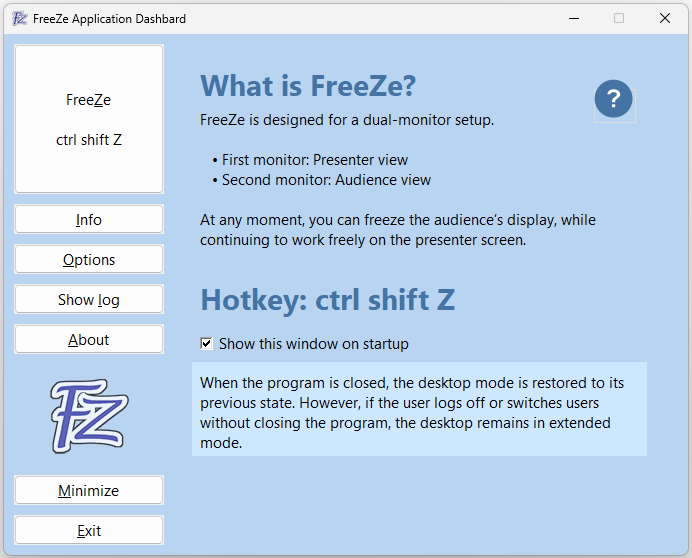 If "Show this window at program startup" is unchecked, the program minimizes to the System Tray upon launch. You can reopen it by clicking the System Tray arrow (bottom-right corner, near the clock and speaker icons).
With "Do not show at program startup" and "Start FreeZe automatically at login" both enabled, the program runs invisibly in the background, waiting for the hotkey.
Options button
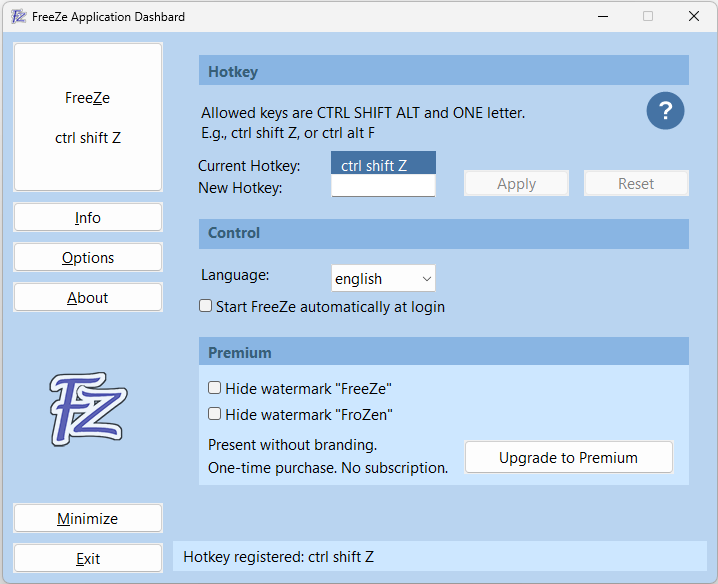 Hotkey: This is the key combination that activates the program
and freezes the second monitor. Valid combinations include ALT, SHIFT, and CTRL along with a letter.
Hotkey: This is the key combination that activates the program
and freezes the second monitor. Valid combinations include ALT, SHIFT, and CTRL along with a letter.
Invalid inputs will be highlighted in red.
Default: CTRL-SHIFT-Z
Language: Choose between German and English.
Default: German
If "Automatically start FreeZe when logging in" is checked,
the program will launch as soon as the user logs in.
Default: false
Premium
Watermarks: In the free version, a small watermark
("FreeZe" or "FroZen") is displayed on the frozen screen.
Hide watermark "FreeZe": Removes the default watermark text.
Hide watermark "FroZen": Removes the alternative watermark text.
Upgrade to Premium: Allows you to present without any branding.
This is a one-time purchase — no subscription required.